For MSFS 2020 & 2024
Never get lost on the taxiway again.
GateKeeper Pro shows you exactly which taxiways to follow — from your gate to the runway, or from the runway back to your gate. Live map. Spoken clearances. Voice commands.
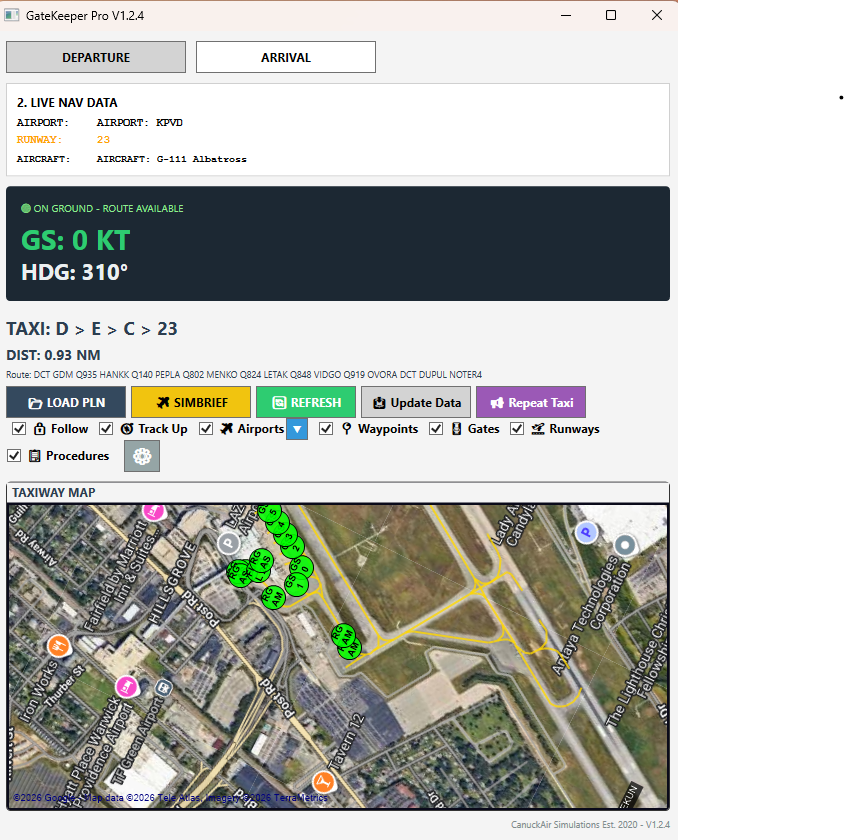
GateKeeper Pro shows you exactly which taxiways to follow — from your gate to the runway, or from the runway back to your gate. Live map. Spoken clearances. Voice commands.
Six core features that turn taxiing from a guessing game into a clear, confident process.
A satellite or road map that follows your aircraft, showing taxiways, gates, runways, and your route drawn in real time.
Follow a thick lime-green line from your aircraft to your destination. The route recalcs whenever you need it, with a single click.
The app speaks your taxi clearance like a real ground controller — using the proper aviation alphabet for every taxiway.
Hold one key, say "ready for taxi," and the app responds. Two-way voice brings your ground ops to life.
Import a flight plan directly from SimBrief or load a .pln file. Everything wires up automatically.
Filter airports by runway length. Toggle gates, runways, waypoints, and procedures on or off. Track Up mode for a real moving-map feel.
Load your flight plan, switch to Departure mode, and GateKeeper Pro calculates the shortest taxi route from where you're parked to your departure runway.
After touchdown, switch to Arrival mode and pick your gate from the dropdown. The app calculates a route from your runway exit to the gate marker.
Set your callsign once, and GateKeeper Pro handles the rest. Two-way voice uses Windows' built-in speech engine — no sign-up, no cloud, no extra software.
Coming Soon !! Download GateKeeper Pro and turn every taxi clearance into a clear, confident process.